I Generated 20 Etsy Listings With AI in 10 Minutes — Here's What Happened
Generate 20 Etsy listings in 10 minutes instead of a weekend. See what worked, what failed, and the exact process to do it faster without losing sales.

You've got a backlog of products sitting in your camera roll, and writing each listing takes 20 to 30 minutes if you're doing titles, tags, and descriptions properly. At that pace, 20 new listings is a full weekend gone.
So I tested whether an AI listing generator could actually cut that down without producing generic, spammy copy that tanks conversion. I ran 20 real products through one, timed it, and checked the output against what Etsy's search algorithm actually rewards.
Here's exactly what happened, what broke, and what I'd change if you're about to try this yourself.
Why This Matters for Etsy Sellers
- Listing backlog is the #1 reason sellers stay small. Every unlisted product is zero potential views, and manual writing is usually the bottleneck, not photography or sourcing.
- Etsy rewards fresh, complete listings. A listing with a thin title, five tags instead of thirteen, and a two-line description underperforms one that's fully optimized, regardless of the product itself.
- Consistency across a shop matters more than people think. If ten of your listings are well-optimized and forty are rushed, the algorithm treats your shop as a mixed bag — your best listings can't fully carry the rest.
- Seasonal windows close fast. If it takes you three weeks to list for a holiday because writing is slow, you miss the search volume spike entirely.
- Burnout kills momentum. Sellers who dread the writing part list less often, and infrequent listing activity itself can quietly hurt visibility over time.
How to Generate Multiple Etsy Listings With AI Step by Step
- Gather your raw product info first. Product name, category, key materials or features, and price — have this ready for each item before you start, so you're not stopping mid-batch to look things up.
- Generate one listing and check it against real search behavior. Before running all 20, test one and open Etsy's search bar to confirm the suggested keywords actually appear in autocomplete — this catches irrelevant AI guesses early.
- Batch the rest once the first one checks out. Run through your remaining products, feeding in the same category and style details so tone stays consistent across your shop.
- Review every title for the 130–140 character sweet spot. Some categories generate shorter, punchier titles by default — manually pad thin ones with an extra long-tail phrase rather than leaving characters unused.
- Check tags for duplicate keywords already in the title. Efficient tag use means covering new search territory, not repeating the same three words the title already covers.
- Scan descriptions for accuracy, not just quality. AI can write a beautifully structured description with a small factual error — confirm materials, dimensions, and care instructions before publishing.
- Run each finished listing through an SEO score check. A score catches weak spots a quick read-through misses, especially keyword alignment between title and tags.
Common Mistakes Etsy Sellers Make
Publishing without reading a single word
The whole point of batching is speed, but zero review means factual errors and awkward phrasing go live. A 30-second skim per listing is non-negotiable.
Using the same generic prompt for every product
Feeding in only the product name without category, materials, or style context produces flatter, more generic output. The more specific your input, the more specific — and more searchable — your title and tags come out.
Ignoring the description structure
A wall of text with no formatting reads poorly on both desktop and mobile. Descriptions need a scannable structure — short paragraphs, a clear "what's included" section, and buyer-focused language — or they hurt conversion even with perfect keywords.
Never checking the output against real Etsy search data
An AI tool can generate a keyword that sounds plausible but has almost zero search volume, or one so competitive it's nearly impossible to rank for. Cross-check suggested keywords against Etsy's own autocomplete before committing to them.
Treating all 20 listings as done forever
AI-generated listings still need the same seasonal refresh and performance review as manually written ones. Set a reminder to revisit low-performing ones after a month.
How BeeSerp Helps You Do This Faster
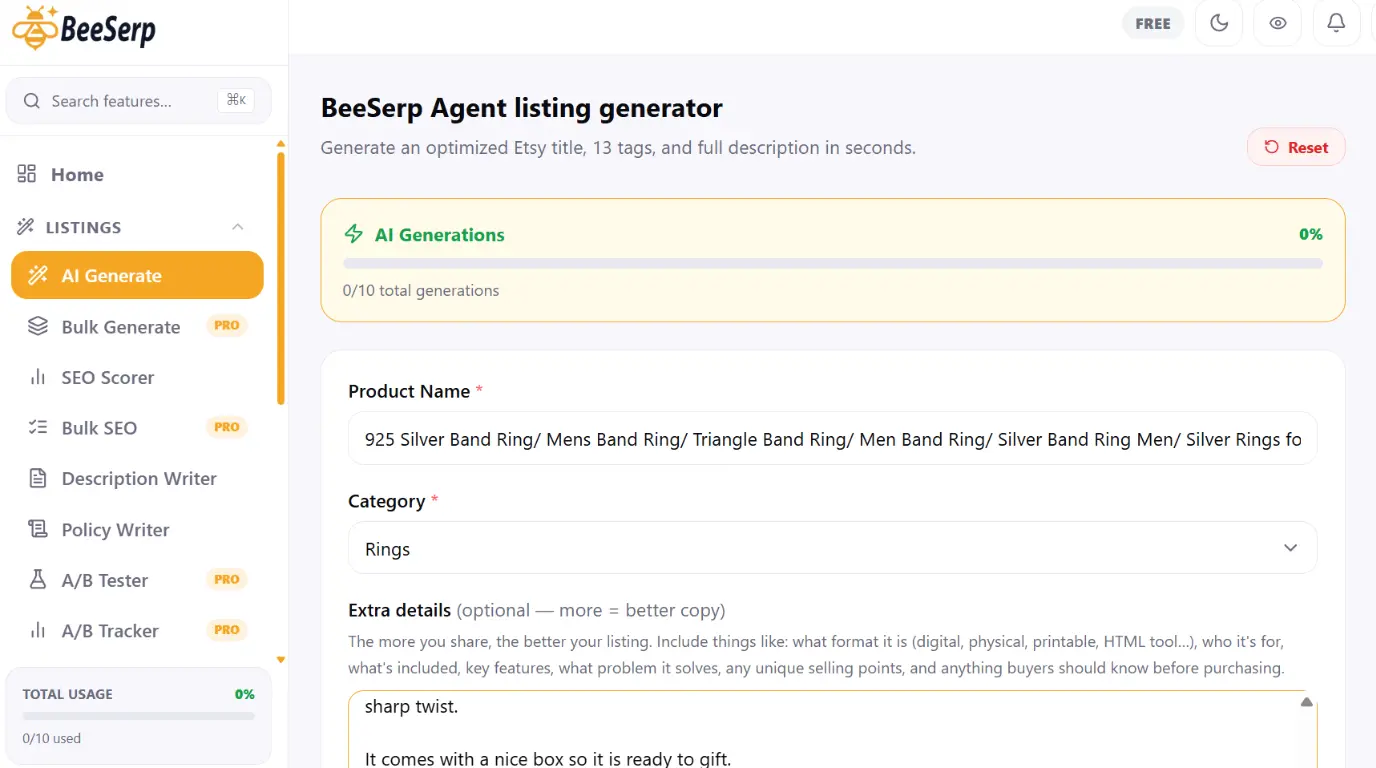
This is essentially the workflow BeeSerp's listing generator is built around. You enter the product name, category, and any key details, and it returns a title sized to the 130–140 character range, 13 tags, and a full structured description in under 10 seconds per listing — which is where the "20 listings in 10 minutes" pace actually comes from.
Because review still matters, BeeSerp's SEO scorer runs against your finished listing and flags exactly what's weak — title length, tag overlap, keyword density — rather than leaving you to guess whether the AI output is actually good or just looks good.
And since more listings mean more transactions to track, BeeSerp's profit tracker shows what each one nets after Etsy's fees, so a fast batch of new listings doesn't quietly include a few priced below break-even.
Pro Tips to Get Better Results on Etsy
- Feed the tool your bestseller's structure as a reference. If you already have one listing performing well, describe its style and tone in your prompt so new listings match what's already working.
- Batch by category, not randomly. Generating five candle listings back-to-back keeps the AI's context tighter than jumping between candles, jewelry, and prints — output stays more relevant this way.
- Save your best generated tags as reusable sets. If a tag combination works well for one product, a keyword library saves you from re-deriving it for every similar item later.
- Re-run underperforming listings after 30 days, not immediately. Etsy needs time to gather click data on a listing before you can tell if the copy — versus something else like photos or price — is the real problem.
Frequently Asked Questions
Does Etsy penalize AI-generated listing descriptions?
No — Etsy doesn't detect or penalize AI-written text specifically. What affects ranking is whether the content is relevant, complete, and matches real buyer search terms, regardless of how it was written.
How long does it actually take to generate 20 listings?
With product details ready in advance, generation itself takes under 10 minutes total. Review and light editing typically adds another 15–20 minutes across all 20, depending on how thorough you are.
Can AI write accurate descriptions for handmade or custom items?
It writes strong structure and tone, but you still need to verify specifics like materials, sizing, and processing time yourself — the AI doesn't know your actual production details unless you provide them.
Will AI-generated titles actually rank in Etsy search?
They can, provided the keywords match real buyer search behavior — which is why checking suggestions against Etsy's own autocomplete matters. A well-structured title with irrelevant keywords won't rank regardless of who wrote it.
Is it better to generate one listing at a time or batch all 20 at once?
Test one first to confirm the output quality and keyword relevance, then batch the rest. This catches systemic issues — like a category being interpreted incorrectly — before they repeat across all 20.
Do I still need to edit AI-generated listings before publishing?
Yes, always. A quick review catches factual errors and lets you add details only you know, like a specific personalization option or a shipping note relevant to that product.
What's the biggest time-saver in this whole process?
Having your product details organized before you start. Most of the delay in "AI listing generation" isn't the generation itself — it's stopping mid-batch to go find a measurement or material name you forgot to note down.
Twenty listings in ten minutes sounds like a gimmick until you actually time yourself writing one manually and compare. The generation speed is real, but the honest takeaway is that review time doesn't disappear — it just shrinks from hours to minutes.
If your shop has a backlog of unlisted products sitting in your camera roll right now, that backlog is costing you visibility every day it sits there unpublished.
Try BeeSerp free for 7 days at beeserp.com and see how fast your own backlog actually clears.
Optimize your Etsy listings with AI
BeeSerp generates titles, 13 tags & full descriptions in seconds.
More Guides
I Generated 20 Etsy Listings With AI in 10 Minutes — Here's What Happened
Generate 20 Etsy listings in 10 minutes instead of a weekend. See what worked, what failed, and the exact process to do it faster without losing sales.
How to Write an Etsy Listing Title That Actually Ranks (2026 Guide)
A step-by-step 2026 guide to writing Etsy listing titles that rank — covers keyword placement, character limits, common mistakes, and how BeeSerp's SEO scorer and AI generator help you fix titles fast.

Etsy Tags: How to Use All 13 to Maximize Your Search Reach
Tags are one of the most underused tools on Etsy. Most sellers use fewer than 10, pick the wrong ones, or repeat keywords from their title. Here's how to use all 13 correctly.